16 min to read
Token Spraying in Microsoft 365: A Hunt and Harden Guide
Stolen sessions hit 79 organisations. Here is how to find them in your tenant
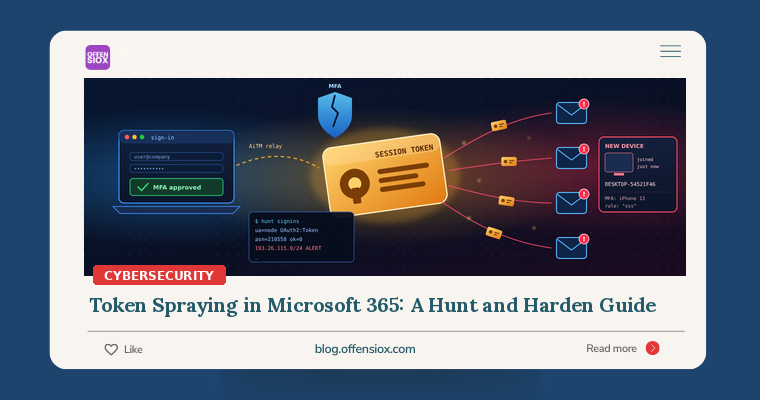
Your users passed MFA. The attacker never needed to. Between 14 July and 22 September 2026, one operator replayed stolen Microsoft 365 sign-in sessions against organisation after organisation, logging 497 successful sign-ins, compromising 97 accounts at 79 organisations and registering at least 48 rogue devices in victims’ Entra ID directories. Huntress, which documented the campaign last week, gave the technique a name that should make every M365 admin sit up: token spraying.
It’s password spraying for the post-MFA era: instead of guessing passwords, the operator replays sessions captured by phishing kits, at volume, from rented servers. And because the attacker then registers devices, swaps MFA methods and hides payroll emails, a password reset alone doesn’t clean it up.
This guide turns the published research into hunts you can run today in Microsoft Sentinel or Defender, plus the hardening that actually stops session replay.
TL;DR / Key takeaways
- Huntress tracked a campaign that replayed stolen M365 tokens from 1337 Services GmbH (AS210558), mostly the 193.26.115.0/24 range: 497 successful sign-ins out of 200,000+ attempts, 79 organisations hit.
- Tokens came from adversary-in-the-middle (AiTM) phishing, device-code phishing and social engineering. MFA was satisfied by the victim, then the session was stolen.
- Persistence was the dangerous part: rogue
DESKTOP-XXXXXXXXEntra devices, MFA methods wiped and replaced (19 organisations, within three hours), and hidden inbox rules targeting payroll and an external accountant.- Hunt on four signals: sign-ins from the campaign infrastructure,
node/bareMozilla/5.0token replay, odd device registrations, and MFA or inbox-rule changes. Queries below.- Fix: unconditional Conditional Access MFA, block device code flow, pilot Token Protection, disable user app consent, and run a full eviction (sessions, devices, MFA methods, rules), not just a password reset.
What happened (quick timeline)
| Date (2026) | Event |
|---|---|
| 14 Jul | First detection: sign-in from 193.26.115[.]221 by an Entra-joined device named DESKTOP- plus eight hex characters |
| 21 Jul | AiTM relay catches a victim at the MFA prompt at 17:18 UTC; session replayed from 193.26.115[.]199 at 17:30; attacker’s “iPhone 13” authenticator activated at 18:08 |
| 3 Aug | Last activity from .221; by now 37 organisations compromised and 37 rogue devices registered |
| 17 Aug | Phase 2 resumes after a two-week gap, adding device-code phishing |
| 11–15 Sep | Phase 3 burst from 193.26.115[.]72 across roughly 28–29 organisations in four days |
| 22 Sep | Final observed replay: macOS session captured, replayed four minutes later from .210 through an RDP/VDI tunnel |
| 22 Oct | Huntress publishes its report; The Hacker News covers it on 26 Oct |
All timeline details are from the Huntress report. (Huntress gives two slightly different Phase 3 figures, 303 successes across 29 organisations and 232 across 28, so treat that burst as an approximation.)
How token spraying works
The chain has four stages (Huntress, The Hacker News):
- Capture. An AiTM phishing page sits between the victim and Microsoft, relaying the real login and MFA prompt. The victim completes MFA; the relay keeps the resulting session. Device-code phishing (“enter this code at microsoft.com/devicelogin”) yields tokens the same way.
- Spray and replay. Stolen sessions are replayed from attacker servers within minutes (12 minutes in July, four in September), in automated attempts across many tenants.
- Persist. The operator registers a fake Windows device in Entra ID, wipes the victim’s MFA methods and enrols their own authenticator. As Huntress puts it, “A registered device can give the attacker a more durable way to request tokens than the stolen session alone.”
- Monetise. Hidden inbox rules bury payroll, direct deposit and bonus emails; one rule hid replies from the victim’s external CPA; one mailbox was turned into a spam cannon.
Huntress saw two distinct tool “builds”, which is gold for detection:
| Build A: scripted token replay | Build B: browser session replay | |
|---|---|---|
| Hosts | .221, .16, .21, .72 |
.199, .210 |
| User agent | node (bare Mozilla/5.0 on .21) |
Current Chrome/Edge on Windows |
| Client app | Microsoft Office, Microsoft Authentication Broker | OfficeHome |
| Resources | Graph, Exchange Online, SharePoint, Device Registration Service | OfficeHome, Exchange Online |
| Device | Rogue DESKTOP- device |
None |
Am I affected?
Run the hunts below if any of these apply:
- You use Microsoft 365 / Entra ID and MFA is your main defence against account takeover. This campaign was designed for exactly that.
- Device code flow is not blocked in your tenant.
- Users can register or join devices and consent to apps without approval.
- You have seen
AADSTS53003(blocked by Conditional Access) failures for real users from unfamiliar IPs. Huntress stresses this code means the credential was valid.
A word on log retention: this campaign began in mid-July. If your sign-in and audit logs aren’t being exported to Sentinel, a SIEM or storage with long retention, the earliest phases may already have aged out. Hunt as far back as you have data.
Hunt 1: Sign-ins from the campaign infrastructure
Start with the published indicators. Huntress notes that blocking 193.26.115.0/24 would cover all six main replay hosts, and that Entra ID Protection had already flagged four of them as verified threat actor IPs. The query covers both interactive and non-interactive sign-ins, because replayed tokens mostly show up in the latter.
// Sentinel / Log Analytics. Adjust lookback to your retention.
let lookback ~|=| 120d;
let CampaignRanges ~|=| dynamic(["193.26.115.0/24"]);
let CampaignIPs ~|=| dynamic(["124.198.132.33","45.83.31.44","192.159.99.172",
    "185.238.2.195","167.148.41.96","2400:8d60:2::1:841d:5dd"]);
union isfuzzy~|=|true SigninLogs, AADNonInteractiveUserSignInLogs
| where TimeGenerated > ago(lookback)
| where ipv4_is_in_any_range(IPAddress, CampaignRanges)
    or IPAddress in (CampaignIPs)
    or tostring(AutonomousSystemNumber) ~|=|~|=| "210558"
| project TimeGenerated, Type, UserPrincipalName, IPAddress, AutonomousSystemNumber,
          AppDisplayName, AppId, ResourceDisplayName, UserAgent, ResultType
| order by TimeGenerated asc
Any ResultType == "0" row is a successful sign-in from attacker infrastructure: treat that user as compromised. Failures with 53003 are still important (valid password, blocked by policy).
Hunt 2: Scripted token replay (Build A)
IOCs rotate; behaviour doesn’t. Build A replayed tokens with a node user agent against the Microsoft Office and Authentication Broker client IDs. Normal Office clients don’t identify themselves that way.
let lookback ~|=| 30d;
let ReplayClients ~|=| dynamic(["d3590ed6~|-|52b3~|-|4102~|-|aeff~|-|aad2292ab01c",   // Microsoft Office
                             "29d9ed98~|-|a469~|-|4536~|-|ade2~|-|f981bc1d605e"]); // Microsoft Authentication Broker
union isfuzzy~|=|true SigninLogs, AADNonInteractiveUserSignInLogs
| where TimeGenerated > ago(lookback)
| where AppId in (ReplayClients)
| where UserAgent in~ ("node", "Mozilla/5.0")      // bare strings only, not full browser UAs
| summarize FirstSeen ~|=| min(TimeGenerated), LastSeen ~|=| max(TimeGenerated),
            Successes ~|=| countif(ResultType ~|=|~|=| "0"), Attempts ~|=| count(),
            Resources ~|=| make_set(ResourceDisplayName, 10), IPs ~|=| make_set(IPAddress, 20)
          by UserPrincipalName, AutonomousSystemNumber
| order by Successes desc
Then look specifically at the Device Registration Service (resource ID 01cb2876-7ebd-4aa4-9cc9-d28bd4d359a9). Huntress recommends hunting sign-ins to it from hosting infrastructure, and Microsoft’s own docs use the same ID to spot device registration via device code flow:
union isfuzzy~|=|true SigninLogs, AADNonInteractiveUserSignInLogs
| where TimeGenerated > ago(90d)
| where ResourceIdentity ~|=|~|=| "01cb2876~|-|7ebd~|-|4aa4~|-|9cc9~|-|d28bd4d359a9"
    or AuthenticationProtocol ~|=|~ "deviceCode"
| project TimeGenerated, UserPrincipalName, IPAddress, AutonomousSystemNumber,
          AppDisplayName, AuthenticationProtocol, OriginalTransferMethod, UserAgent, ResultType
| order by TimeGenerated desc
Most users never register a device from a VPS provider, and most organisations have no business need for device code sign-ins. Every hit deserves a look.
Hunt 3: Rogue devices
The rogue devices were named DESKTOP- plus exactly eight uppercase hex characters (for example DESKTOP-54521F46), which Huntress points out does not match Windows’ default of DESKTOP- plus seven alphanumeric characters. It also suggests auditing Device- and Work Pc names with eight hex characters.
Audit-log view:
AuditLogs
| where TimeGenerated > ago(120d)
| where OperationName in ("Add device", "Register device")
| mv~|-|expand Target ~|=| TargetResources
| extend DeviceName ~|=| tostring(Target.displayName)
| where DeviceName matches regex @"^(DESKTOP~|-||Device~|-|)[0~|-|9A~|-|F]{8}$" or DeviceName startswith "Work Pc"
| extend Actor ~|=| tostring(InitiatedBy.user.userPrincipalName)
| project TimeGenerated, OperationName, DeviceName, Actor, Result
Directory view with Microsoft Graph PowerShell (catches devices older than your log retention):
Connect~|-|MgGraph ~|-|Scopes "Device.Read.All"
Get~|-|MgDevice ~|-|All ~|-|Property Id,DisplayName,OperatingSystem,TrustType,RegistrationDateTime,ApproximateLastSignInDateTime |
  Where~|-|Object { $_.DisplayName ~|-|cmatch '^(DESKTOP~|-||Device~|-|)[0~|-|9A~|-|F]{8}$' ~|-|or $_.DisplayName ~|-|like 'Work Pc*' } |
  Select~|-|Object DisplayName, Id, OperatingSystem, TrustType, RegistrationDateTime, ApproximateLastSignInDateTime
Huntress warns that the naming pattern is “rare, but not unique”, so check the registered owner and registration source before deleting anything. A device registered from AS210558 an hour after a suspicious sign-in is not a coincidence.
Hunt 4: MFA swaps and hidden inbox rules
In 19 organisations the victim’s MFA methods were wiped and a new authenticator registered within three hours of the first attacker sign-in. This query pairs deletions with new registrations for the same user:
let window ~|=| 3h;
let Deleted ~|=| AuditLogs
    | where TimeGenerated > ago(120d)
    | where OperationName ~|=|~|=| "User deleted security info"
    | extend UPN ~|=| tostring(TargetResources[0].userPrincipalName)
    | project DeletedAt ~|=| TimeGenerated, UPN;
AuditLogs
| where TimeGenerated > ago(120d)
| where OperationName ~|=|~|=| "User registered security info"
| extend UPN ~|=| tostring(TargetResources[0].userPrincipalName)
| project RegisteredAt ~|=| TimeGenerated, UPN, ResultReason
| join kind~|=|inner Deleted on UPN
| where RegisteredAt between (DeletedAt .. DeletedAt + window)
| project UPN, DeletedAt, RegisteredAt, ResultReason
For inbox rules, the campaign’s tells were one-to-three-character or punctuation-only names (., sss, ,., d), rules moving mail to RSS Feeds, RSS Subscriptions or Conversation History, and rules keyed on payroll and banking terms. Some were created through the Outlook REST API rather than Outlook itself, so include UpdateInboxRules:
OfficeActivity
| where TimeGenerated > ago(120d)
| where Operation in ("New~|-|InboxRule", "Set~|-|InboxRule", "UpdateInboxRules")
| extend Details ~|=| strcat(tostring(Parameters), tostring(OperationProperties))
| extend RuleName ~|=| extract(@'"Name","Value":"([^"]*)"', 1, tostring(Parameters))
| where strlen(RuleName) between (1 .. 3)
    or RuleName matches regex @"^[^A~|-|Za~|-|z0~|-|9]+$"
    or Details has_any ("RSS Feeds", "RSS Subscriptions", "Conversation History")
    or Details has_any ("payroll", "direct deposit", "bonus", "bank")
| project TimeGenerated, UserId, ClientIP, Operation, RuleName, Details
And a point-in-time sweep from Exchange Online PowerShell, which catches rules regardless of how they were created:
Get~|-|Mailbox ~|-|ResultSize Unlimited | ForEach~|-|Object {
  Get~|-|InboxRule ~|-|Mailbox $_.UserPrincipalName ~|-|IncludeHidden ~|-|ErrorAction SilentlyContinue |
    Where~|-|Object { $_.Name.Length ~|-|le 3 ~|-|or $_.Name ~|-|match '^[\W_]+$' ~|-|or
                   $_.MoveToFolder ~|-|match 'RSS|Conversation History' ~|-|or $_.DeleteMessage } |
    Select~|-|Object MailboxOwnerId, Name, Enabled, MoveToFolder, DeleteMessage, MarkAsRead, SubjectOrBodyContainsWords
}
Field formats vary slightly between tenants and log sources, so run each query against a known-good test rule or device first.
Evicting the attacker properly
Huntress is blunt that a password reset alone leaves rogue devices and MFA methods in place. For each confirmed account, in this order:
- Disable the account and revoke sessions. Microsoft’s documented steps (Revoke user access):
Connect~|-|MgGraph ~|-|Scopes "User.ReadWrite.All","Directory.AccessAsUser.All"
$User ~|=| Get~|-|MgUser ~|-|Search UserPrincipalName:'[email protected]' ~|-|ConsistencyLevel eventual
Update~|-|MgUser ~|-|UserId $User.Id ~|-|AccountEnabled:$false
Revoke~|-|MgUserSignInSession ~|-|UserId $User.Id
Get~|-|MgUserRegisteredDevice ~|-|UserId $User.Id ~|-|All | ForEach~|-|Object {
    Update~|-|MgDevice ~|-|DeviceId $_.Id ~|-|AccountEnabled:$false
}
- Reset the password, then remove unrecognised MFA methods and re-register the user’s real ones in person or over a verified channel.
- Delete the rogue devices (after confirming), remove malicious inbox rules, and check for new enterprise applications granted consent.
- Expect a short tail. Microsoft notes existing access tokens stay usable until they expire (one hour by default); Huntress observed roughly 90 minutes. Keep watching the account until that window passes.
- Notify finance. If payroll or accountant emails were being hidden, assume a payment-diversion attempt and verify recent bank-detail changes by phone.
Hardening: make stolen sessions worthless
- Unconditional MFA. Huntress recommends a Conditional Access policy requiring MFA (or blocking) for All Users, All Cloud Apps and All Client App types, with no carve-outs that legacy or “trusted” paths can slip through.
- Block device code flow. Microsoft calls it a high-risk method and says it “recommends blocking device code flow wherever possible” (Authentication flows). Use report-only mode first and carve out only genuine kiosk or conference-room devices. Note that since September 2024 “all resources” policies also apply to the Device Registration Service.
- Pilot Token Protection. This Conditional Access session control makes supported apps present only device-bound tokens, so a stolen token can’t be replayed from another machine. It is generally available for native Exchange Online, SharePoint Online and Teams apps on Windows, macOS and iOS/iPadOS, with web support still in preview (Token Protection). Start in report-only mode with a pilot group.
- Lock down device registration and app consent. Limit who can join or register devices, and disable user consent to new applications in favour of an admin approval workflow (Huntress recommendation).
- Alert on the signals above. Turn Hunts 2–4 into scheduled analytics rules. Huntress also advises prioritising response by credential validity, not spray volume: “Do not trigger response based on spray volume.”
Prioritised checklist
Immediate (today)
- Run Hunt 1 across all the sign-in data you have; treat any success as an incident.
- Block
193.26.115.0/24via a Conditional Access named location (block policy). - Run the rogue-device and inbox-rule sweeps (Hunts 3 and 4).
This week
- Deploy a device-code-flow block in report-only, review, then enforce.
- Close gaps in your MFA policy: all users, all apps, all client app types.
- Disable user app consent; review existing enterprise app grants.
- Schedule Hunts 2–4 as alerts and extend sign-in/audit log retention.
Longer term
- Roll out Token Protection from report-only to enforcement for Exchange, SharePoint and Teams.
- Move privileged and finance users to phishing-resistant MFA, which an AiTM relay can’t proxy.
- Add AiTM and device-code scenarios to phishing simulations and IR runbooks.
OffensioX perspective
The uncomfortable lesson here is that MFA has become a checkpoint, not a wall. Once a session token exists, whoever holds it is “you”, and modern phishing kits are built to steal that token rather than the password. What made this campaign effective wasn’t sophistication; it was industrialisation: one operator, one rented /24, a script with a node user agent, and persistence steps (device join, MFA swap, inbox rules) that most small IT teams never audit. That’s why we expect token spraying to spread. For businesses in Pakistan and across South Asia, where Microsoft 365 is often run by a one- or two-person IT team and payroll and supplier payments are negotiated over email, the payroll-hiding rules seen here map almost perfectly onto the invoice and salary-diversion fraud we regularly see in BEC cases. The controls that defeat this are mostly configuration, not new products: block device code flow, bind tokens to devices, and watch the identity audit log as closely as you watch the firewall. If you’d like an expert review, OffensioX offers penetration testing and Microsoft 365 / cloud identity security assessments, including simulated AiTM phishing to show how your tenant holds up.
References
- Huntress — M365 Token Spray and Replay Campaign (22 Oct 2026)
- The Hacker News — Microsoft 365 Token-Replay Attacks Compromise 97 Accounts at 79 Organizations
- Microsoft Learn — Token Protection in Microsoft Entra Conditional Access
- Microsoft Learn — Conditional Access: Authentication flows
- Microsoft Learn — Revoke user access in Microsoft Entra ID
- Microsoft Learn — SigninLogs table reference