12 min to read
Outlook Zero-Day CVE-2026-124194: One Email, One Leaked Password Hash
The only exploited bug in a record-sized Patch Tuesday hits the app every business opens first. Here is what to patch and what to block.
Microsoft’s November 2026 Patch Tuesday is enormous. Depending on whose count you use it fixed somewhere between 1,093 and 1,235 vulnerabilities, including more than 60 rated Critical. Yet the bug that matters most this week is rated only Moderate, scores 6.5, and is described as a mere “spoofing” issue.
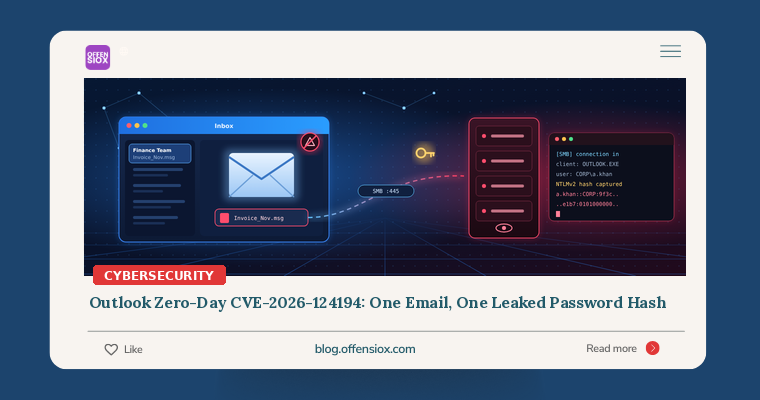
It is also the only one Microsoft says attackers were already exploiting before the fix shipped. CVE-2026-124194 lets an attacker send a crafted message that, once opened in Outlook, quietly makes the victim’s computer reach out to an attacker-controlled server, without the usual warning about external content. Along the way Windows hands over the user’s NTLMv2 password hash. CISA added it to the Known Exploited Vulnerabilities (KEV) catalog the same day.
A leaked hash is not a “moderate” problem for a business. It can be cracked offline or relayed to log in as that user elsewhere. And the delivery mechanism is the one channel nobody can switch off: email.
TL;DR / Key takeaways
- What: CVE-2026-124194 is an Outlook flaw (CWE-356, “UI does not warn user of unsafe actions”, CVSS 3.1 score 6.5). Opening a crafted message makes Outlook connect to an attacker’s server without the external-content warning, leaking the user’s NTLMv2 hash.
- Exploited: Microsoft confirms in-the-wild exploitation. CISA added it to KEV on 10 November 2026 with a federal deadline of 24 November 2026. No threat actor, targets or IOCs have been published.
- Affected: Microsoft 365 Apps for Enterprise, Office LTSC 2021 and Office LTSC 2024 (x86 and x64), per the advisory as summarised by multiple researchers.
- Fix: Install the November 2026 Office security update. Fixed builds: LTSC 2021 16.0.14334.21048+, LTSC 2024 16.0.17932.21140+, Microsoft 365 Apps on the current Office security release. Note: the Windows cumulative update alone does not fix it.
- Harden: Block outbound SMB (TCP 445) to the internet, audit and then restrict outgoing NTLM, and put admins in the Protected Users group.
Timeline
- Before 10 November 2026: Attackers exploit the flaw in the wild as a zero-day. Microsoft has not said when exploitation began, who was targeted, or at what scale.
- 10 November 2026: Microsoft publishes the fix as part of November Patch Tuesday and marks the bug “Exploitation Detected”. The advisory credits a researcher who worked with Anthropic’s Claude; SOC Prime reports the credit names a researcher using the moniker “nono” and Benoît Sevens.
- 10 November 2026: CISA adds CVE-2026-124194 to the KEV catalog, giving US federal agencies until 24 November 2026 to patch. CISA lists known ransomware use as “unknown”.
- 11 November 2026: Security vendors publish analysis. No official IOCs have been released as of writing.
How the attack works (conceptually)
This is a classic forced authentication attack, and it helps to understand the Windows behaviour it abuses.
1. Windows authenticates automatically to network paths. When a Windows application is told to open a resource on a network share (a UNC path such as \\server\share\file), Windows tries to log in to that server using the current user’s credentials. On most business networks that means NTLM, so the server receives an NTLMv2 challenge-response, which is effectively a password hash.
2. Outlook normally guards against this. Outlook is not supposed to fetch external content from an email without warning the user. That warning is the security boundary.
3. CVE-2026-124194 skips the warning. According to Microsoft’s description, as quoted by Qualys and SOCRadar, an unauthenticated attacker sends a specially crafted message file and convinces the user to open it in an affected Outlook. Outlook then connects to an attacker-controlled network location without displaying the external-content warning. The attacker’s server collects the NTLMv2 hash, which “could be used to impersonate the user” in follow-on attacks.
A few important details and caveats:
- User interaction is required. The CVSS vector reported by SOC Prime is
AV:N/AC:L/PR:N/UI:R/S:U/C:H/I:N/A:N: network attack, low complexity, no privileges, but the user must take an action. SOC Prime reports Microsoft states the Preview Pane is not an attack vector; the message has to be opened. One automated analysis claims previewing also works, which conflicts with that, so treat the preview question as settled only once you have read Microsoft’s advisory yourself. - The lure may vary. Qualys and SOCRadar describe a crafted message file; Tenable describes a crafted Office file. Either way, the victim is persuaded to open an attachment or message.
- Why “spoofing” and “Moderate”? Microsoft scores the direct impact (disclosure of an authentication hash), not what an attacker does next. In practice a captured hash can be cracked offline if the password is weak, or relayed in real time to services that accept NTLM without signing or Extended Protection.
If this sounds familiar, it should. In March 2023 Microsoft fixed CVE-2023-23397, an exploited Outlook bug that also leaked NTLM hashes by making Outlook connect to an attacker’s server. The 2026 bug follows the same playbook (forced authentication without user consent), and three years on, outbound SMB from user workstations is still the enabler.
Real-world exploitation: what we know and don’t
What is confirmed:
- Microsoft rates it “Exploitation Detected”, and it is the only actively exploited vulnerability in this release according to Qualys and SOCRadar.
- CISA has independently added it to KEV.
What is not known yet:
- Who is exploiting it. Microsoft has not named an actor, campaign or victim sector.
- IOCs. SOCRadar and SOC Prime both note that no IPs, domains, file hashes, sender addresses or filenames have been published. Be cautious with any “IOC list” circulating that does not trace back to Microsoft or CISA.
- Public exploit code. Aggregators give conflicting signals about whether a public proof of concept exists. Assume one will appear soon if it hasn’t already; that is the usual pattern after a widely studied Outlook fix.
One more detail worth noting: the credited discovery involved an AI model. That does not change the risk to you, but it is a clear marker that AI-assisted vulnerability research is now finding bugs in core business software at the same time attackers are exploiting them.
The rest of November’s Patch Tuesday
The Outlook bug should come first, but do not stop there. Tenable highlights several Critical issues that Microsoft rates “Exploitation More Likely”:
| CVE | Component | Type | CVSS |
|---|---|---|---|
| CVE-2026-118146 | Windows Active Directory Domain Services | Remote code execution (authenticated) | 8.8 |
| CVE-2026-118207 | Microsoft Exchange Server | Remote code execution (authenticated) | 8.8 |
| CVE-2026-119952 | Windows Schannel | Remote code execution (unauthenticated) | 8.1 |
| CVE-2026-120002 | SharePoint Server | Elevation of privilege (rated Important) | 9.9 |
Why the totals differ: Tenable counts 1,093 CVEs and SOCRadar 1,094, while Qualys, Infosecurity Magazine and BleepingComputer report 1,235. Qualys also counts 142 Microsoft Edge (Chromium) CVEs, and 1,093 + 142 = 1,235, so the larger figure appears to include Edge and other third-party CVEs. Whatever the number, it is a huge month for patch teams, which is exactly why prioritisation matters.
Am I affected?
You are affected if you run any of the following without the November 2026 Office security update:
- Microsoft 365 Apps for Enterprise (32-bit and 64-bit)
- Office LTSC 2021 (32-bit and 64-bit), below build 16.0.14334.21048
- Office LTSC 2024 (32-bit and 64-bit), below build 16.0.17932.21140
Public summaries of the advisory do not mention Outlook for Mac, the web version of Outlook, or older perpetual versions. Check the MSRC entry for your exact SKU rather than assuming.
To check a Windows machine’s Office build quickly:
~|#| Click~|-|to~|-|Run Office version and update channel
Get~|-|ItemProperty 'HKLM:\SOFTWARE\Microsoft\Office\ClickToRun\Configuration' |
  Select~|-|Object VersionToReport, CDNBaseUrl, UpdateChannel
In Outlook itself: File > Office Account > About Outlook shows the version and build.
Important: SOCRadar points out that the fix ships through Office updates, not the Windows cumulative update. If your patch reports only track Windows KBs, they can show “compliant” while Outlook is still vulnerable.
Detection: is anyone trying this on us?
With no official IOCs, detection is behavioural. The core signal is simple: Outlook should almost never make SMB or WebDAV connections to the internet.
Microsoft Defender for Endpoint / Sentinel (KQL):
// Outlook making SMB/NetBIOS connections to public IP addresses
DeviceNetworkEvents
| where Timestamp > ago(30d)
| where InitiatingProcessFileName ~|=|~ "outlook.exe"
| where RemotePort in (445, 139)
| where RemoteIPType ~|=|~|=| "Public"
| project Timestamp, DeviceName, InitiatingProcessAccountName,
          RemoteIP, RemotePort, RemoteUrl, ActionType
| order by Timestamp desc
// WebDAV fallback: WebClient~|-|driven HTTP connections shortly after Outlook activity
DeviceNetworkEvents
| where Timestamp > ago(30d)
| where InitiatingProcessCommandLine has_any ("davclnt.dll", "WebClient")
| where RemoteIPType ~|=|~|=| "Public"
| summarize Connections ~|=| count(), Targets ~|=| make_set(RemoteIP, 20)
    by DeviceName, InitiatingProcessAccountName, bin(Timestamp, 1h)
Splunk with Sysmon (Event ID 3, network connection):
index~|=|sysmon EventCode~|=|3 Image~|=|"*\OUTLOOK.EXE" (DestinationPort~|=|445 OR DestinationPort~|=|139)
| where NOT cidrmatch("10.0.0.0/8", DestinationIp)
    AND NOT cidrmatch("172.16.0.0/12", DestinationIp)
    AND NOT cidrmatch("192.168.0.0/16", DestinationIp)
| stats count min(_time) as first_seen max(_time) as last_seen
    by host, User, DestinationIp, DestinationPort
Other places to look:
- Perimeter firewall logs: any outbound TCP 445 from user subnets to the internet. If your firewall allows it today, every hit deserves a look.
- Windows NTLM Operational log (Applications and Services Logs > Microsoft > Windows > NTLM) after you enable outgoing NTLM auditing, as SOC Prime recommends. It shows which hosts are sending NTLM to which servers.
- Mail gateway: messages with
.msgor.emlattachments from external senders, especially to finance, executives and IT admins. These are normal sometimes, but worth a sweep for the past few weeks.
If you find Outlook talking SMB to an unknown public IP, treat that user’s password as compromised: reset it, revoke sessions, and review their sign-ins for reuse of the credential.
What to do: a prioritised checklist
Immediately (today)
- Push the November Office update to every Microsoft 365 Apps, LTSC 2021 and LTSC 2024 install. For Click-to-Run, you can force it with
"C:\Program Files\Common Files\microsoft shared\ClickToRun\OfficeC2RClient.exe" /update user. - Verify builds, don’t just trust the deployment tool: LTSC 2021 at or above 16.0.14334.21048, LTSC 2024 at or above 16.0.17932.21140, Microsoft 365 Apps on the current Office security release.
- Block outbound TCP 445 (and 139) to the internet at the perimeter firewall and on endpoint firewalls for laptops that leave the office. There is almost never a business reason for a workstation to reach an internet SMB server.
- Warn staff: do not open unexpected
.msg/.emlattachments or “forwarded message” files, even from familiar names, until patching is confirmed.
This week
- Run the hunting queries above across at least the last 30 days.
- Audit outgoing NTLM with the Group Policy setting Network security: Restrict NTLM: Outgoing NTLM traffic to remote servers in Audit all mode. Review what breaks before moving to deny.
- Add privileged accounts to the Protected Users group, which stops them from using NTLM at all.
- Enforce SMB signing, LDAP signing and Extended Protection for Authentication (EPA) on servers so that a stolen hash cannot simply be relayed to them.
- Disable the WebClient service on workstations that do not need WebDAV, to close the HTTP-based fallback path.
- Patch the Criticals, starting with Exchange (CVE-2026-118207), AD DS (CVE-2026-118146) and Schannel (CVE-2026-119952).
Longer term
- Plan your NTLM exit. Every new Outlook hash leak is another reminder that NTLM is a liability. Inventory what still needs it and move to Kerberos or modern authentication.
- Enforce strong, long passwords (or passwordless sign-in). A captured NTLMv2 hash is only as safe as the password behind it.
- Track Office separately from Windows in patch compliance reporting.
- Run a phishing simulation using a harmless “open this message file” lure to see how many users would have triggered this bug.
What this means for Pakistan and South Asia
Many organisations in the region run Microsoft 365 Apps on laptops that move between office, home and mobile hotspots. Those devices often sit outside the perimeter firewall’s protection, so a rule blocking outbound 445 at head office does not help them. Endpoint firewall rules matter here. On-premises Exchange and file servers that still run without SMB signing make relaying a captured hash much easier. If that describes your environment, the hardening steps above are as important as the patch.
OffensioX perspective
CVE-2026-124194 is a good example of why CVSS alone is a poor patching guide. A 6.5 “Moderate” spoofing bug is the one being exploited, while dozens of higher-scoring Criticals are not (yet). Attackers do not need remote code execution if they can collect valid credentials from inside your network with one email. The real weakness is not this single bug but a decade-old chain: Windows still authenticates automatically to remote paths, NTLM is still enabled almost everywhere, and many firewalls still allow outbound SMB. Patch Outlook today, but fix the chain this quarter, because the next forced-authentication bug is a matter of when, not if. Hash capture and NTLM relay remain some of the most dependable routes from a single user account to domain admin in internal penetration tests.
If you’d like to know whether a leaked hash could take an attacker from one inbox to your domain controllers, OffensioX offers internal penetration testing and Active Directory security assessments that test exactly this path.
References
- Microsoft Security Response Center: CVE-2026-124194
- Tenable: Microsoft’s November 2026 Patch Tuesday addresses 1,093 CVEs (CVE-2026-124194)
- Qualys: Microsoft and Adobe Patch Tuesday, November 2026 Security Update Review
- SOCRadar: November 2026 Patch Tuesday: 1,094 Flaws, One Exploited
- SOC Prime: CVE-2026-124194, Outlook Zero-Day Exposes NTLM Hashes
- Infosecurity Magazine: Microsoft Breaks Another Patch Tuesday Record with 1,235 Flaws
- BleepingComputer: Microsoft November 2026 Patch Tuesday fixes 1,235 flaws, Outlook zero-day
- CISA: CISA Adds Six Known Exploited Vulnerabilities to Catalog (10 November 2026)
- CISA Known Exploited Vulnerabilities Catalog
- Microsoft Security Response Center: CVE-2023-23397 (Outlook, 2023)