13 min to read
Entra Connect Health API Leak: What Happened and What to Do
For almost four months, a Microsoft API bug let outsiders read admin emails, licence tiers and sync status from customer tenants. No patch is needed on your side, but your admins are now phishing targets.
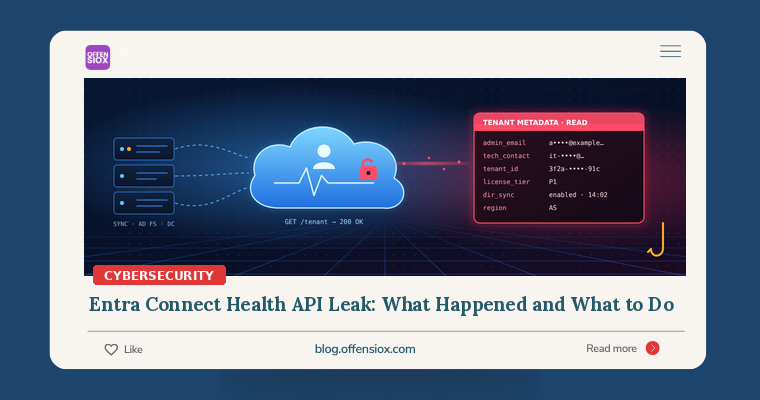
Most cloud incidents you hear about begin with something the customer got wrong, such as a leaked key, a public bucket or a reused password. This one doesn’t. On 20 November 2026 Microsoft started telling customers that attackers had exploited a flaw in Microsoft Entra Connect Health, the cloud service that monitors on-premises identity servers. The flaw let them read tenant metadata, including the email addresses of the administrators who run those tenants.
Microsoft has fixed the bug on its side and says customers don’t need to patch anything. That’s true, but it isn’t the end of the story. Someone now holds a list of identity administrators, together with the licence tier, sync status and domain of each tenant. That’s exactly the information you’d want for a convincing, targeted phishing campaign against the people with the most privileged accounts in the organisation.
TL;DR / key takeaways
- What: A bug in the Entra Connect Health API, introduced on 23 July 2026, gave unauthorised callers read-only access to tenant-level metadata. Microsoft detected it on 9 November, fixed it server-side on 19 November and began notifying affected tenants through Azure Service Health on 20 November.
- What leaked: admin and technical-contact email addresses, tenant ID, display name, initial domain, country/region, Entra licence tier, directory sync status and last sync time, Connect Health onboarding status and an expired certificate.
- What did not leak (per Microsoft): passwords or hashes, authentication tokens, valid cryptographic keys, on-prem AD topology or Azure subscription data. Microsoft found no unauthorised configuration changes.
- Your job now: confirm whether you got a notice (check the Azure portal itself, not an email link), warn the named admins about targeted phishing, put phishing-resistant MFA on every privileged role, and hunt sign-in and audit logs from 23 July onward.
- Still unknown: who did it, how many tenants were hit and when exploitation started. Microsoft has declined to say.
What happened
The service
Entra Connect Health is the monitoring part of Microsoft’s hybrid identity stack. You install a lightweight agent on Entra Connect Sync servers, AD FS servers and domain controllers. The agent sends health data, alerts, sync errors and AD FS usage analytics to the Entra admin center. Microsoft’s documentation says it requires Entra ID P1 licences, so it’s mostly used by mid-sized and larger organisations that sync on-premises Active Directory with Microsoft 365. That covers many enterprises, banks, telcos and MSP-managed customers here in Pakistan.
The flaw
According to Microsoft’s notice, as reported by BleepingComputer, Microsoft “detected a vulnerability in the Microsoft Entra Connect Health API that was introduced on 23 July 2026.” After deploying a fix and reviewing telemetry, Microsoft concluded that “unauthorized read-only access to tenant-level metadata associated with your organization had occurred,” and added: “We did not identify any unauthorized configuration changes.”
Microsoft hasn’t published a technical root cause or, as far as we can find, a CVE. The CyberSec Guru’s analysis ties the exposed fields to a tenant lookup operation (GetTenant). It describes the issue as a property-level authorisation failure: the API returned fields to callers who shouldn’t have been able to see them, and the response looked like a normal, successful request. That fits the “broken object property level authorisation” category (API3:2023) in the OWASP API Security Top 10. It’s a classic API bug and very hard to catch from the outside, because nothing errors.
What was exposed
Microsoft’s notice, as quoted by BleepingComputer and others, lists:
| Exposed | Why an attacker cares |
|---|---|
| Admin and technical-contact email addresses | A ready-made target list of privileged people |
Tenant ID, display name, initial domain (*.onmicrosoft.com), country code, region |
Makes lures look authentic; some of this is already public via OpenID discovery |
| Entra licence tier | Shows which defences you can afford (for example, P1 lacks Identity Protection and PIM, which need P2) |
| Directory sync status and last sync timestamp | Shows you run hybrid identity and how healthy your sync is |
| Connect Health onboarding status | Confirms which on-prem identity servers you monitor |
| An expired certificate | Used for a Microsoft internal service decommissioned in late 2024; Microsoft says it’s no longer in use |
Microsoft states that passwords, password hashes, authentication tokens, valid cryptographic keys, on-premises server and AD topology details, and Azure subscription information were not exposed.
The expired certificate shows a common failure in its own right. The CyberSec Guru quotes Microsoft as saying it “had not been removed from Connect Health storage and continued to be included in the GetTenant API response”, even though the service it belonged to had been shut down a year earlier. Secrets that outlive their purpose tend to turn up in incidents like this.
Timeline
| Date (2026) | Event |
|---|---|
| 6 Jul | Cymulate reports a separate Connect Health authorisation flaw to MSRC (see below) |
| 23 Jul | The flaw behind this incident is introduced into the Connect Health API |
| 10 Aug | Microsoft tells Cymulate its earlier issue is resolved, with rollout in progress |
| 3 Sep | Cymulate publishes “Read-Only Is a Lie” |
| 9 Nov | Microsoft detects the flaw, about 109 days after it was introduced |
| 19 Nov | Server-side fix deployed |
| 20 Nov | Investigation concluded; notifications sent via Azure Service Health |
| 21 Nov | BleepingComputer reports the incident; MSPs report notices for multiple customer tenants |
Connect Health’s second authorisation problem this year
This is the second Connect Health authorisation problem made public in 2026. In September, Cymulate Research Lab showed that a principal holding only a “read-only” directory role (Security Reader, Global Reader or Hybrid Identity Administrator, with no Azure RBAC at all) could call a Connect Health credentials endpoint and get back a live agent client secret (AgentKey). The root cause was that the credential-issuing operation was classed as a read (credentials/read), so a wildcard */read permission matched it. Cymulate rated it CVSS 3.1 8.3. Microsoft confirmed it and reported it resolved on 10 August.
Nobody has shown that the two bugs are related, and you shouldn’t assume they are. Both, though, are authorisation mistakes in the same service’s API surface within a few months of each other. If you run hybrid identity, that’s enough reason to look at your Connect Health footprint more closely.
Am I affected?
- You received an Azure Service Health advisory about Connect Health: Microsoft confirmed unauthorised reads of your tenant’s metadata. Treat your admin list as known to an adversary.
- You use Connect Health but received nothing: Microsoft’s notices went to tenants with confirmed unauthorised access. You’re probably not in the confirmed set. Still, the hardening steps below are worth doing anyway.
- You don’t use Connect Health (cloud-only or Cloud Sync without it): this incident shouldn’t directly involve you. Be wary of “Microsoft security notice” emails anyway, because attackers love a news hook.
- You’re an MSP or CSP: check Service Health for each customer tenant you manage. BleepingComputer reports that some providers received notices for several customers.
Verify the notice inside the Azure portal (Service Health → Security advisories), not through links in an email. The CyberSec Guru reports that fake notices are already circulating, and a real breach of admin emails followed by a fake “breach notification” is an obvious phishing pretext.
One uncomfortable detail: you won’t find the attacker’s API reads in your own logs. They happened inside Microsoft’s service, and Connect Health configuration reads don’t appear in customer-visible Entra audit logs or the Azure Activity Log. What you can hunt for is follow-on activity.
What to do: prioritised checklist
Immediately (today)
- Check Azure Service Health in every tenant you own or manage for the Connect Health advisory, and record its tracking ID for your incident file.
- Brief the people named. Tell your Global Admins, other privileged role holders and listed technical contacts that they’re likely phishing targets. Brief the help desk too. Expect lures that quote your real tenant name,
onmicrosoft.comdomain, licence tier or “sync errors”. - Lock down privileged sign-in. Require phishing-resistant MFA (FIDO2 security keys, Windows Hello for Business or certificate-based authentication) for all admin roles using a Conditional Access authentication strength policy. SMS and push-approval MFA can be beaten by adversary-in-the-middle phishing kits.
- Freeze risky help-desk flows. Require out-of-band identity verification before any MFA reset or new method registration for an admin account.
This week
- Hunt from 23 July onward. Customer audit logs default to roughly 30 days of retention in Entra, so pull whatever you’ve exported to Sentinel, Log Analytics or your SIEM. Look for unusual admin sign-ins, new MFA methods, consent grants and role changes (queries below).
- Run Microsoft’s read-only scripts from
aka.ms/ConnectHealth/scripts(for exampleGetTenant.ps1andGetTenantPksCertificateDetails.ps1; they need Az.Accounts 2.17.0+). They show current values of the same field types, which helps you understand your exposure. They are not a forensic record of what was accessed. - Clean up technical contacts and notification recipients. Use role mailboxes or distribution lists for technical contacts and alerts where possible, rather than the personal mailbox of your most privileged admin.
- Close out the Cymulate issue. List every holder of Global Reader, Security Reader, Security Administrator and Hybrid Identity Administrator, including service principals. Treat these as privileged. If you can’t rule out credential reads before mid-August, re-register your Connect Health agents to rotate their keys.
Longer term
- Treat identity infrastructure as Tier-0. That covers Entra Connect servers, AD FS and DCs, and the cloud roles that can see or manage them.
- Use Privileged Identity Management (P2) for just-in-time admin access, so a phished admin identity carries no standing privilege.
- Tune, don’t mute, Connect Health alerts. An agent that goes silent (“Health Service data is not up to date”) could mean credential theft or tampering, not just a noisy server.
- Plan regulatory notifications. Admin email addresses are personal data. If you’re under GDPR, Pakistan’s sectoral rules (such as SBP or PTA requirements) or contractual breach clauses, ask your legal or compliance team whether a confirmed notice triggers reporting.
Detection queries (Microsoft Sentinel / Log Analytics)
These assume Entra SigninLogs and AuditLogs are sent to a Log Analytics workspace. Replace the admin list with the accounts named in your notice or your privileged role holders, and widen the time range as far back as your retention allows.
1. Admin sign-ins from new countries or IPs, and single-factor successes
let admins ~|=| dynamic(["[email protected]","[email protected]"]);
let lookback ~|=| datetime(2026~|-|07~|-|23);
SigninLogs
| where TimeGenerated >~|=| lookback
| where UserPrincipalName in~ (admins)
| where ResultType ~|=|~|=| 0
| summarize FirstSeen~|=|min(TimeGenerated), LastSeen~|=|max(TimeGenerated),
            Apps~|=|make_set(AppDisplayName, 10),
            AuthReq~|=|make_set(AuthenticationRequirement)
          by UserPrincipalName, IPAddress, Country~|=|tostring(LocationDetails.countryOrRegion)
| order by FirstSeen desc
Look closely at any row where AuthReq contains singleFactorAuthentication, and at countries or ISPs you’ve never seen for that admin.
2. New MFA methods registered on privileged accounts
let admins ~|=| dynamic(["[email protected]","[email protected]"]);
AuditLogs
| where TimeGenerated >~|=| datetime(2026~|-|07~|-|23)
| where OperationName in ("User registered security info",
                          "User registered all required security info",
                          "Admin registered security info")
| extend Target ~|=| tostring(TargetResources[0].userPrincipalName)
| where Target in~ (admins)
| project TimeGenerated, OperationName, Target,
          Actor ~|=| tostring(InitiatedBy.user.userPrincipalName),
          IP ~|=| tostring(InitiatedBy.user.ipAddress)
3. Consent grants, role additions and new app credentials
AuditLogs
| where TimeGenerated >~|=| datetime(2026~|-|07~|-|23)
| where OperationName in ("Consent to application",
                          "Add member to role",
                          "Add eligible member to role",
                          "Add service principal credentials")
     or OperationName has "Certificates and secrets management"
| project TimeGenerated, OperationName,
          Actor ~|=| coalesce(tostring(InitiatedBy.user.userPrincipalName),
                           tostring(InitiatedBy.app.displayName)),
          Target ~|=| tostring(TargetResources[0].displayName),
          Result
| order by TimeGenerated desc
Any consent or credential change that doesn’t map to a ticket deserves a closer look. Illicit OAuth consent is a common way to keep access to a phished admin’s mailbox.
4. Connect Health agent tampering signals (Cymulate’s guidance)
Watch the Azure Activity Log for operations under Microsoft.ADHybridHealthService from users or workloads that aren’t performing a genuine server registration. In Connect Health itself, look for agents moving to unregistered or unhealthy states outside a change window.
OffensioX perspective
Two lessons come out of this. First, metadata is not harmless. An admin email address, a licence tier and a “last sync” timestamp look dull in isolation. Together they tell an attacker who to phish, which defences you lack and that your cloud identity is tied to an on-prem forest worth pivoting into. Many serious Microsoft 365 compromises start with a well-aimed phish against exactly these people.
Second, SaaS risk you can’t patch is still risk you have to manage. You couldn’t have prevented this bug, and you can’t see the reads in your logs. The bug sat in production for about 109 days before anyone noticed. All you control is how much damage a stolen admin list can do, which means phishing-resistant MFA, no standing privilege, and a help desk that can’t be talked into resetting MFA. If those controls had been in place on 22 July, this incident would be a non-event for you. If they aren’t in place today, close that gap this week.
If you’d like an independent check of how your Microsoft 365 and Entra tenant would hold up against a targeted admin-phishing campaign, OffensioX offers identity-focused penetration testing and cloud security assessments.
References
- BleepingComputer: Microsoft Entra Connect Health flaw exploited to steal tenant data (21 Nov 2026)
- The CyberSec Guru: Microsoft Entra Connect Health vulnerability went undetected for 109 days
- WindowsForum: Microsoft Entra Connect Health API flaw exposed admin emails and tenant data
- Aviatrix Threat Research Center: Microsoft Entra Connect Health API breach 2026
- Microsoft: Connect Health read-only PowerShell scripts (aka.ms/ConnectHealth/scripts)
- Microsoft Learn: What is Microsoft Entra Connect and Connect Health
- Cymulate Research Lab: Read-Only Is a Lie, an Entra ID privilege escalation (3 Sep 2026)
- OWASP API Security Top 10 2023: API3 Broken Object Property Level Authorization
- Microsoft Learn: Conditional Access authentication strengths