14 min to read
Hunting SCKit: How to Find Rogue ScreenConnect Clients After the MSP Attacks
A blank extension key, 493 endpoints in two waves, and a trap aimed at your technicians. Here is how to hunt for it.
Remote support tools are the master keys of modern IT. Whoever controls the console can run commands as SYSTEM on every endpoint it manages, across every customer an MSP serves. Last week someone found a way to use that key without logging in.
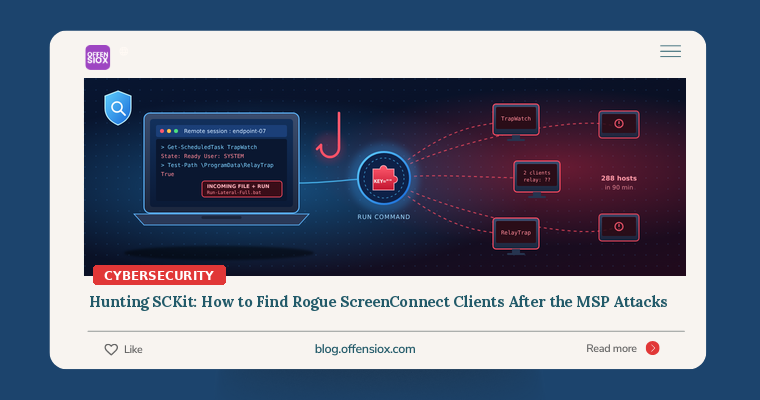
On 11 November 2026 an attacker used ConnectWise ScreenConnect’s Run Command feature to push rogue ScreenConnect clients and a 16-part toolkit called SCKit onto at least 288 endpoints across 48 organisations, all within 90 minutes. Huntress says a second wave on 13 November hit 205 more hosts across 41 organisations. SCKit stays on the machine and then sets a trap: it waits for a technician to connect so it can try to jump back onto the technician’s workstation and, from there, into every other customer.
This is a hands-on hunt guide. If you run ScreenConnect, rely on an MSP that does, or just want to know what a rogue remote-access client looks like in your telemetry, the queries and checks below will help you answer “are we clean?” with evidence.
TL;DR / Key takeaways
- Entry was most likely an extension, not a ScreenConnect bug. Huntress links the activity to the third-party RMM+ extension (versions 1.0.31 and 1.0.32), whose
RMMPlus.AccessKeydefaulted to blank and accepted an empty value. That bypassed ScreenConnect accounts, roles and MFA. ConnectWise has not confirmed the vector.- Fully patched servers were hit. Huntress observed the activity on ScreenConnect builds 26.6.6.9747 and 26.7.6.9783.
- SCKit stays put and targets technicians. It installs two attacker-controlled Access clients, swaps the legitimate Guest for a locally compiled RelayTrap.exe, and tries CVE-2026-84869 (fixed in client 26.6.5) to push a file to any technician who connects. Researchers say that pivot has not succeeded so far.
- Hunt on behaviour, not hashes. Scripts are rebuilt per host. Look for a second ScreenConnect client, the
TrapWatchtask,C:\ProgramData\RelayTrap\, theRelayTrapLiteAlertRun value and new Defender exclusions.- Never investigate a suspect host through ScreenConnect. Use EDR live response, WinRM or another out-of-band channel.
What happened: a short timeline
| Date (2026) | Event |
|---|---|
| Early September | Huntress reports rogue ScreenConnect clients spreading in a worm-like pattern. ConnectWise ships client 26.6.5, fixing CVE-2026-84869 (Huntress rates it CVSS 9.9). |
| 11 Nov, ~17:47 UTC | First wave: Run Command pushes rogue clients and SCKit to 288 hosts in 48 organisations within 90 minutes. |
| 11 Nov, 22:45 UTC | ConnectWise advisory: five third-party extensions (Labtech Plus, RMM Plus, RMM+, RMM Plus Password Link, RMM+ Password Link) disabled across about 400 partner environments. |
| 12 Nov | Huntress, BleepingComputer and The Register publish details. Blackpoint Cyber publishes its analysis of the recovered loader. |
| 13 Nov, 16:12 UTC | Second wave: 205 more hosts across 41 organisations. Blackpoint reports activity against on-premises ScreenConnect too. |
ConnectWise stresses that it has found “no evidence of a compromise of ConnectWise infrastructure”, and that having one of the extensions installed “does not mean those environments were compromised.” It also warns that “disabling extensions and resetting credentials alone may not remove unauthorized software”. In other words, turning the extension off doesn’t clean up hosts that were already hit.
How SCKit works (conceptually)
You need to understand the chain to hunt it well. Pulling together Huntress, Blackpoint and the Cloud Security Alliance research note:
- Command delivery. Run Command executes a batch script as SYSTEM from the ScreenConnect client directory. Huntress notes there was no matching technician login, and the commands were tied to RMM+ in the logs.
- Rogue client install. An attacker MSI is saved to
C:\Windows\Temp\sc.msiand installed silently. Wave 1 installer URLs carried a company field likec=Exploited<N>; wave 2 used/Bin/UpdateConnect.ClientSetup.msi?e=Access&y=Guest&c=ExploitedNOTUSA. - Keyed loader.
sckit-run.batfetchessckit-decoder.ps1. The server releases the decryption key only when the request includes the host’sMachineGuid. The decrypted stage runs ask<32 hex>.ps1in hidden PowerShell with execution policy bypassed. - Persistence. The toolkit unpacks to
C:\ProgramData\RelayTrap\.Installer.ps1adds Defender exclusions (Blackpoint saw attempts for install paths,msiexec.exeandpowershell.exe) and installs a second rogue client. In wave 2 that client ran as a service called “Windows Update Agent” (UpdateConnect.ClientService.exeunderC:\ProgramData\Windows Update Agent (de362a425905bcc4)\). - The trap.
TrapWatch.ps1compilesRelayTrap.csintoC:\ProgramData\RelayTrap\trapbins\<client id>\RelayTrap.exe, stops the legitimate ScreenConnect service and sets it to manual. TheTrapWatchscheduled task then runs as SYSTEM every 10 seconds. The fake Guest reconnects with the original parameters, so to a technician the session looks normal. - The pivot attempt. About 2.5 seconds after a technician connects, RelayTrap sends a file-run transfer (
Run-Lateral-Full.bat) aimed at CVE-2026-84869 in the technician’s Host client. If that worked,Panel-Lateral.ps1would steal the.ASPXAUTHconsole cookie (using a downloadedsqlite3.exeagainst browser cookie stores) and push a script through Shared Toolbox to every reachable session, deleting it about 60 seconds later.
The good news is that Blackpoint tested this against a current client and found that “the Guest side queued the transfer, but the current client never requested or ran the payload.” Huntress says the console takeover “failed in every recovered host log” it examined. Both firms also found flaws in the code itself. Huntress assesses that RelayTrap’s source appears LLM-generated. The persistence and rogue access worked, though, and hosts were reinfected after network isolation was lifted.
Am I affected?
You should hunt if any of these apply:
- You run ScreenConnect (cloud or on-premises) and have ever installed RMM+, RMM Plus, Labtech Plus or their Password Link variants. ConnectWise’s remote disablement did not reach on-premises servers.
- An MSP manages your endpoints with ScreenConnect. Ask them directly, and ask for evidence (see the checklist below).
- Your technicians use Host clients older than 26.6.5 (Blackpoint gives the fixed build as 26.6.5.9742).
- You find more than one ScreenConnect client on an endpoint and can’t account for it. (Co-managed environments may legitimately have two, so baseline first.)
Step 1: Check the console before the endpoints
Start at the panel, because it tells you which endpoints to look at.
- Extensions: List every installed extension. If RMM+ is present, confirm it’s disabled and check whether
RMMPlus.AccessKeywas ever blank. - Run Command and Shared Toolbox history: Look for commands run against many sessions in a short burst on or after 11 November, commands with no corresponding technician login, and toolbox items that appear and vanish within a minute.
- Audit logs: Look for new administrator accounts, role changes and extension API calls you can’t explain.
- Session list: Look for new guest/access sessions whose company field contains
Exploited.
Step 2: Hunt across endpoints (EDR / SIEM)
The queries below use published indicators and are written for Microsoft Defender XDR advanced hunting. Adapt the table and field names to your own tools. Treat them as starting points and tune them to your environment.
KQL: SCKit files and the RelayTrap directory
// Files dropped by the SCKit chain (Huntress / Blackpoint indicators)
DeviceFileEvents
| where Timestamp > datetime(2026~|-|11~|-|10)
| where FolderPath has @"\ProgramData\RelayTrap"
   or FileName in~ ("sckit~|-|run.bat","sckit~|-|decoder.ps1","sckit~|-|loader.ps1","sc.msi",
                    "TrapWatch.ps1","RelayTrap.cs","RelayTrap.exe","Lite~|-|Alert.ps1",
                    "Panel~|-|Lateral.ps1","runnew.cmd","ToolboxRelayUploader.exe",
                    "Stop~|-|LabTrap.ps1","Run~|-|Lateral~|-|Full.bat","lab~|-|trap~|-|cleanup~|-|embedded.ps1")
   or FileName matches regex @"^k[0~|-|9a~|-|fA~|-|F]{32}\.ps1$"
| project Timestamp, DeviceName, ActionType, FolderPath, FileName,
          InitiatingProcessFileName, InitiatingProcessCommandLine
| order by Timestamp asc
KQL: persistence (TrapWatch task, Run key, Defender exclusions)
// Scheduled task, Run value and Defender exclusion changes
union
( DeviceProcessEvents
  | where FileName ~|=|~ "schtasks.exe" and ProcessCommandLine has "TrapWatch" ),
( DeviceRegistryEvents
  | where RegistryValueName ~|=|~ "RelayTrapLiteAlert"
     or (RegistryKey has @"Windows Defender\Exclusions"
         and InitiatingProcessFileName in~ ("powershell.exe","pwsh.exe","msiexec.exe")) ),
( DeviceProcessEvents
  | where FileName in~ ("powershell.exe","pwsh.exe")
  | where ProcessCommandLine has "Add~|-|MpPreference"
    and ProcessCommandLine has_any ("ExclusionPath","ExclusionProcess") )
| where Timestamp > datetime(2026~|-|11~|-|10)
| project Timestamp, DeviceName, FileName, ProcessCommandLine,
          RegistryKey, RegistryValueName, RegistryValueData
KQL: unapproved ScreenConnect relays
Legitimate ScreenConnect client services carry their relay host in the command line (the h= parameter). So the most reliable signal is any client that talks to a relay you didn’t approve. Fill in your own instance hostnames:
let ApprovedRelays ~|=| dynamic(["yourinstance.screenconnect.com","relay.yourmsp.com"]);
DeviceProcessEvents
| where Timestamp > ago(30d)
| where FileName endswith ".ClientService.exe"
   or (FileName ~|=|~ "msiexec.exe" and ProcessCommandLine has "ClientSetup.msi")
| extend Relay ~|=| extract(@"[?&]h~|=|([^&\s""]+)", 1, ProcessCommandLine)
| where isnotempty(Relay) and not(Relay in~ (ApprovedRelays))
   or ProcessCommandLine has_any ("Exploited","UpdateConnect")
| summarize FirstSeen~|=|min(Timestamp), Hosts~|=|dcount(DeviceName),
            Devices~|=|make_set(DeviceName, 50) by FileName, Relay
KQL: published network indicators
let SCKitDomains ~|=| dynamic(["ns.mo7sen.dev","sc.payproofkit.com","cdn007~|-|digitaldownloads.com",
                            "soxnewwork.homedns.org","newnewnew.gotdns.org","007.from~|-|ak.com"]);
let SCKitIPs ~|=| dynamic(["185.99.255.28","185.241.211.197","155.94.150.39"]);
DeviceNetworkEvents
| where Timestamp > datetime(2026~|-|11~|-|01)
| where RemoteUrl has_any (SCKitDomains) or RemoteIP in (SCKitIPs)
| project Timestamp, DeviceName, InitiatingProcessFileName,
          InitiatingProcessCommandLine, RemoteUrl, RemoteIP, RemotePort
As with any infrastructure indicator, these go stale quickly. A hit is strong evidence, but no hit doesn’t mean you’re clean.
KQL: the portproxy trick
Huntress saw netsh interface portproxy redirect 127.0.0.1:88 to an attacker IP. Legitimate portproxy use on workstations is rare:
DeviceProcessEvents
| where Timestamp > datetime(2026~|-|11~|-|01)
| where FileName ~|=|~ "netsh.exe" and ProcessCommandLine has_all ("portproxy","add")
| project Timestamp, DeviceName, AccountName, ProcessCommandLine,
          InitiatingProcessFileName, InitiatingProcessParentFileName
Sigma: generic rule for any SIEM
title: SCKit RelayTrap Persistence or Loader Artifacts
id: 6f1d2c0e~|-|5b8a~|-|4c3e~|-|9e61~|-|2f7a1c9d4b10
status: experimental
description: Detects file and process artifacts of the SCKit toolkit used in Nov 2026 ScreenConnect MSP attacks
references:
  ~|-| https://www.huntress.com/blog/sckit~|-|worm~|-|rogue~|-|screenconnect
  ~|-| https://blackpointcyber.com/blog/screenconnect~|-|attack~|-|sckit/
author: OffensioX
date: 2026~|-|11~|-|17
tags:
  ~|-| attack.persistence
  ~|-| attack.t1053.005
  ~|-| attack.t1219
logsource:
  category: process_creation
  product: windows
detection:
  sel_paths:
    CommandLine|contains:
      ~|-| '\ProgramData\RelayTrap'
      ~|-| 'sckit~|-|decoder.ps1'
      ~|-| 'sckit~|-|run.bat'
      ~|-| 'TrapWatch'
      ~|-| 'RelayTrapLiteAlert'
      ~|-| 'ExploitedNOTUSA'
  sel_trap:
    Image|endswith: '\RelayTrap.exe'
  condition: 1 of sel_*
falsepositives:
  ~|-| None expected
level: high
Step 3: Triage a single host without ScreenConnect
If you don’t have an EDR, use WinRM or your EDR’s live-response shell, never a ScreenConnect session, to run a read-only check like this. It only lists items and changes nothing:
~|#| Read~|-|only SCKit triage. Run via EDR live response or WinRM, NOT ScreenConnect.
"~|-|~|-|~|-| ScreenConnect~|-|style services ~|-|~|-|~|-|"
Get~|-|CimInstance Win32_Service |
  Where~|-|Object { $_.PathName ~|-|match 'ClientService\.exe' ~|-|or $_.Name ~|-|match 'ScreenConnect|Windows Update Agent' } |
  Select~|-|Object Name, State, StartMode, StartName, PathName | Format~|-|List

"~|-|~|-|~|-| Artifacts ~|-|~|-|~|-|"
'C:\ProgramData\RelayTrap','C:\Windows\Temp\sc.msi','C:\Windows\Temp\sckit~|-|run.bat',
'C:\Windows\Temp\sckit~|-|decoder.ps1' | ForEach~|-|Object { "{0} : {1}" ~|-|f $_, (Test~|-|Path $_) }
Get~|-|ChildItem C:\ProgramData ~|-|Directory ~|-|Filter 'Windows Update Agent*' ~|-|ErrorAction SilentlyContinue

"~|-|~|-|~|-| Scheduled task / Run key ~|-|~|-|~|-|"
Get~|-|ScheduledTask ~|-|TaskName 'TrapWatch' ~|-|ErrorAction SilentlyContinue
Get~|-|ItemProperty 'HKLM:\SOFTWARE\Microsoft\Windows\CurrentVersion\Run' |
  Select~|-|Object RelayTrapLiteAlert

"~|-|~|-|~|-| Defender exclusions ~|-|~|-|~|-|"
Get~|-|MpPreference | Select~|-|Object ExclusionPath, ExclusionProcess

"~|-|~|-|~|-| Port proxies ~|-|~|-|~|-|"
netsh interface portproxy show all
Things to look for: two or more ClientService.exe services, a legitimate ScreenConnect service set to Manual and stopped, any RelayTrap path, or Defender exclusions for powershell.exe or msiexec.exe.
Step 4: Respond and remediate
Immediate (today)
- Disable RMM+ and the related extensions on every instance, including on-premises servers. Set a strong
RMMPlus.AccessKeyif you must keep it while you migrate off. - Isolate confirmed hosts, but don’t treat isolation as cleanup. Hosts were reinfected once isolation was lifted.
- Remove the persistence through an out-of-band channel: the rogue service(s), the
TrapWatchtask,C:\ProgramData\RelayTrap\, theRelayTrapLiteAlertRun value, the Defender exclusions, any portproxy rules, andsckit-*,runnew.cmd,ToolboxRelayUploader.exeandsqlite3.exein Temp. Verify the legitimate client separately before you delete anything. - Treat any technician workstation that connected to a suspect host as exposed. From a clean device, end all ScreenConnect web sessions, rotate those technicians’ passwords and revoke their browser and identity-provider sessions.
- Upgrade every Host and Guest client to 26.6.5 or later.
This week
- Run the hunts above across all managed tenants, not just the ones you think were hit.
- Restrict Run Command, Shared Toolbox and file transfer to the smallest possible group of technicians.
- Allowlist approved RMM tools and instance IDs, and alert on any client that points to an unapproved relay. This is CISA’s guidance in AA23-025A.
- Customers of MSPs: ask your provider in writing whether they used the affected extensions, what they found, and for the hunt results for your endpoints.
Longer term
- Govern remote-support platforms as tier-zero, in the same class as domain controllers and identity providers. Put extensions through change control, and remove any that authenticate with shared keys instead of user identity and MFA.
- Run technician work from hardened privileged-access workstations with short console session lifetimes.
- Split customers across separate instances or session groups to limit the blast radius.
- Design for reverse trust: assume a customer endpoint may be hostile to the technician who connects to it.
OffensioX perspective
SCKit shows two trends coming together. First, attackers keep skipping the hardened front door (the patched console with MFA) and walking through a side entrance nobody inventoried. Here it was a third-party plugin with a shared key that defaulted to empty. Second, the toolkit was built for speed: per-host keyed payloads, 288 hosts in 90 minutes, and code that researchers believe was partly machine-written. Bugs in the code are the main reason it didn’t spread further. The next version won’t be so buggy. For MSPs, and for the many businesses in Pakistan and the Gulf that outsource IT support, the lesson is that every remote-support tool is privileged infrastructure, and each extension adds to what an attacker can reach. At OffensioX we test exactly these paths in our penetration tests and security assessments: RMM consoles, their extensions, and the trust between technicians and endpoints. If you’d like an outside view of yours, we can help.
References
- Huntress: SCKit Worm Installs Rogue ScreenConnect Clients and Session Cookie Relays Across Hundreds of Endpoints
- Blackpoint Cyber: ScreenConnect attack and SCKit analysis
- BleepingComputer: New worm-like ‘SCKit’ malware targets MSPs in ScreenConnect attacks
- The Register: Hackers exploiting ScreenConnect plugin flaw to spread malware across hundreds of PCs
- Cloud Security Alliance: SCKit and Rogue ScreenConnect Clients research note
- ConnectWise Trust Center: Security advisories
- NVD: CVE-2026-84869
- CISA, NSA, MS-ISAC: Protecting Against Malicious Use of RMM Software (AA23-025A)
- CISA et al.: Protecting Against Cyber Threats to MSPs and their Customers (AA22-131A)