13 min to read
SonicWall SSL VPN SAML MFA Bypass: A Hunt and Harden Guide
Your VPN says "SAML plus MFA". CVE-2026-19868 says "not always"
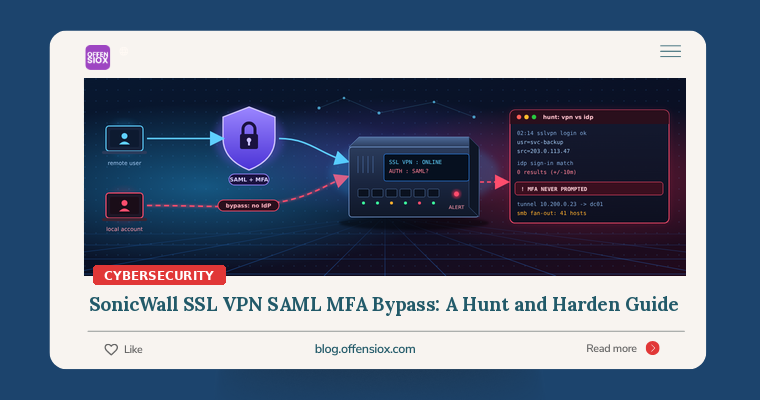
Plenty of organisations moved their SonicWall SSL VPN to SAML single sign-on for one reason: it puts every remote login behind the identity provider’s MFA and conditional access. CVE-2026-19868 breaks that assumption. According to SonicWall’s advisory, a user who holds valid credentials for an alternate authentication method can bypass the SAML controls on the SSL VPN, and with them the MFA the IdP was supposed to enforce (Security Affairs).
SonicWall says its PSIRT “has investigated a report indicating potential exploitation of this vulnerability,” and CISA added the flaw to its Known Exploited Vulnerabilities (KEV) catalog on 6 November with a 20 November remediation deadline (Ostorlab, WindowsForum).
The awkward part for defenders: a login that bypasses SAML never reaches your IdP. Your Entra ID or Okta sign-in logs will look clean. This guide shows how to work out whether you are exposed, how to close the gap, and how to hunt for the logins your identity provider never saw.
TL;DR / Key takeaways
- CVE-2026-19868 (CWE-308) lets a user with valid non-SAML credentials skip SAML, and SAML-enforced MFA, on SonicOS SSL VPN. SonicWall rates it CVSS 7.1; the CISA ADP score in the CVE record is 7.5.
- Affected: Gen7 SonicOS 7.3.3-7015 and earlier (fixed in 7.3.4-7013+) and Gen8 SonicOS 8.2.2-8015 and earlier (fixed in 8.2.3-8015+). It only matters if SAML is enabled for SSL VPN logins.
- It is in CISA KEV (added 6 Nov, due 20 Nov). SonicWall lists no workaround and has published no IOCs yet.
- The same release fixes five more SonicOS flaws, including a pre-auth heap overflow in SSL VPN (CVE-2026-82308). Patch even if you don’t use SAML.
- Hunt by correlating firewall VPN logins with IdP sign-ins: a successful VPN session with no matching SAML sign-in is your red flag.
What happened (quick timeline)
| Date | Event |
|---|---|
| 2025 | Akira ransomware affiliates reported logging in to SonicWall SSL VPN accounts even where MFA was enabled (Security Affairs), a reminder of how attractive this edge is |
| 6 Nov 2026 | SonicWall publishes advisory SNWLID-2026-0014, “SonicWall SonicOS Affected By Multiple Vulnerabilities”, covering CVE-2026-19868 and five other CVEs |
| 6 Nov 2026 | CISA adds CVE-2026-19868 to KEV |
| 7 Nov 2026 | Wider coverage; no actor, victim count or IOCs named by SonicWall or CISA |
| 20 Nov 2026 | KEV remediation due date for US federal agencies |
Sources: Ostorlab, GBHackers, Security Affairs, WindowsForum.
Details are still thin. At the time of writing, NVD had not completed its own analysis, and neither SonicWall nor CISA has named who exploited the flaw or how widely.
How the bypass works (conceptually)
SonicWall’s description is short: “An authentication enforcement vulnerability in SonicOS SSLVPN service may allow a user with valid credentials for an alternate authentication method to bypass SAML authentication controls. Successful exploitation may also bypass SAML-enforced multi-factor authentication (MFA).”
In plain terms, a SonicWall firewall can know about users from several places at once: local user accounts on the appliance, LDAP/Active Directory, RADIUS, and so on. When you switch SSL VPN to SAML, the intent is that every VPN login goes through the IdP. CVE-2026-19868 means that intent is not fully enforced: an account that can still authenticate through one of those other methods can reach the VPN without the SAML round trip. Ostorlab’s reading is that the gateway “does not enforce the SAML policy for accounts that can authenticate by another method” (Ostorlab). No patch diff or exploit write-up is public, and we won’t speculate about the request flow.
What this is not: it is not unauthenticated remote code execution, and no source describes account creation. The attacker needs a working password for a non-SAML method. That sounds like a high bar until you remember how many firewalls still carry a forgotten local account from initial setup, an LDAP bind that accepts any AD user, or credentials harvested in earlier VPN breaches.
Am I affected?
You are in scope if all of these are true:
- You run a Gen7 (TZ 270–670, NSa 2700–6700, NSsp 10700–15700, NSv 270/470/870) or Gen8 (TZ 80–680, NSa 2800–5800, NSv XS/S/M/L) firewall, per the model lists reported by Ostorlab;
- It runs SonicOS 7.3.3-7015 or earlier (Gen7) or 8.2.2-8015 or earlier (Gen8);
- SSL VPN is enabled and reachable; and
- SAML is enabled for SSL VPN logins.
SonicWall’s advisory, as quoted by Ostorlab, says the flaw “ONLY impacts the SonicOS SSLVPN interface or service if SAML is enabled for SSLVPN logins”. SMA 1000 appliances are reported as not affected.
Not using SAML? You are not exposed to this CVE, but SNWLID-2026-0014 also fixes CVE-2026-82308 (a 7.5-rated pre-auth heap overflow in SSL VPN), two 8.8-rated management interface flaws (CVE-2026-107154 and CVE-2026-107155), two TACACS+ client overflows and a weak password hashing issue on virtual appliances (GBHackers). The upgrade is worth doing on every affected firewall.
Step 1: Patch, and close the side doors
Upgrade to SonicOS 7.3.4-7013 or later (Gen7) or 8.2.3-8015 or later (Gen8) from MySonicWall. SonicWall lists no workaround, so until the upgrade is done, shrink what an attacker can use:
- Inventory every account that can log in to SSL VPN without SAML. Check local users and groups, membership of the SSLVPN Services group, and any LDAP or RADIUS group mappings that grant VPN access. Most SAML-only deployments should have close to zero.
- Remove or disable those accounts, or strip their SSL VPN access. If one must stay (a break-glass account, say), give it a long unique password and TOTP, and alert on every use.
- Rotate passwords for any non-SAML account that keeps VPN access. Assume old VPN credentials may already be in someone’s list.
- Restrict the SSL VPN to the countries or source ranges you actually need (geo-IP filtering or an address-object allowlist on the WAN-to-SSLVPN rule).
- Keep the management interface off the internet. Two of the bundled CVEs are management-interface bugs.
Step 2: Get the right logs in one place
The hunt below needs two data sources side by side:
| Source | What you need from it | Where |
|---|---|---|
| SonicOS syslog / CEF | SSL VPN login success and failure, username, source IP, assigned tunnel IP, timestamps | Forward to your SIEM (Device > Log > Syslog); make sure the user activity and SSL VPN categories are enabled |
| IdP sign-in logs | Sign-ins to the SonicWall SAML application, user, IP, MFA result | Entra ID SigninLogs, Okta System Log, or equivalent |
| Windows / AD logs | What the VPN tunnel IPs did next | Domain controller Security log (4624, 4625, 4768, 4769) |
If your firewall only keeps logs locally, export what is there now. Local buffers on smaller TZ models roll over quickly.
Step 3: Hunt for VPN logins the IdP never saw
The core logic is simple: every legitimate SAML-backed VPN session should have a matching sign-in at your IdP within a few minutes. A VPN login with no matching IdP sign-in is either a non-SAML account (which you just decided shouldn’t exist) or exactly what CVE-2026-19868 enables.
Field names differ between SonicOS versions, syslog and CEF formats, and SIEM parsers. Treat the queries below as templates and check them against a few of your own known-good login events first.
Microsoft Sentinel (KQL)
// 1. Successful SSL VPN logins from SonicWall (CEF via AMA/Syslog connector)
let lookback ~|=| 30d;
let vpnLogins ~|=| CommonSecurityLog
| where TimeGenerated > ago(lookback)
| where DeviceVendor ~|=|~ "SonicWall"
| where Activity has_any ("SSL VPN", "SSLVPN") and Activity has_any ("login", "logged in")
| where Activity !has "fail" and Activity !has "denied"
| extend VpnUser ~|=| tolower(coalesce(SourceUserName, DestinationUserName))
| project VpnTime ~|=| TimeGenerated, VpnUser, SourceIP, Activity, DeviceName;
// 2. Sign~|-|ins to the SonicWall SAML app at the IdP (set your app name)
let samlSignins ~|=| SigninLogs
| where TimeGenerated > ago(lookback)
| where AppDisplayName ~|=|~ "SonicWall SSL VPN"   // ~|<|~|-|~|-| your enterprise app name
| where ResultType ~|=|~|=| 0
| extend SamlUser ~|=| tolower(tostring(split(UserPrincipalName, "@")[0]))
| project SamlTime ~|=| TimeGenerated, SamlUser, IPAddress;
// 3. VPN logins with no SAML sign~|-|in for that user within +/~|-| 10 minutes
vpnLogins
| join kind~|=|leftouter (samlSignins) on $left.VpnUser ~|=|~|=| $right.SamlUser
| extend Delta ~|=| abs(datetime_diff('minute', VpnTime, SamlTime))
| summarize Matched ~|=| countif(Delta ~|<|~|=| 10) by VpnTime, VpnUser, SourceIP, DeviceName
| where Matched ~|=|~|=| 0
| order by VpnTime desc
Usernames are the usual trap: the firewall may log jdoe while Entra logs [email protected]. Normalise both sides the way your environment needs.
Splunk (SPL)
index~|=|firewall sourcetype~|=|sonicwall* ("SSL VPN" OR "SSLVPN") ("login" OR "logged in") NOT ("fail*" OR "denied")
| rex field~|=|_raw "usr~|=|\"(?~|<|vpn_user>[^\"]+)\""
| rex field~|=|_raw "src~|=|(?~|<|src_ip>\d{1,3}(?:\.\d{1,3}){3})"
| eval vpn_user~|=|lower(vpn_user)
| eval t~|=|_time
| join type~|=|left max~|=|0 vpn_user
    [ search index~|=|idp sourcetype~|=|azure:aad:signin appDisplayName~|=|"SonicWall SSL VPN" status.errorCode~|=|0
      | eval vpn_user~|=|lower(mvindex(split(userPrincipalName,"@"),0))
      | eval saml_time~|=|_time
      | fields vpn_user saml_time ]
| eval matched~|=|if(isnotnull(saml_time) AND abs(t ~|-| saml_time) ~|<|~|=| 600, 1, 0)
| stats max(matched) AS matched values(src_ip) AS src_ip by t vpn_user
| where matched~|=|0
| eval t~|=|strftime(t, "%F %T")
| sort ~|-| t
Quick wins that need no IdP correlation
- Logins by local or service-style accounts (
admin, setup accounts, test users, LDAP bind accounts) over SSL VPN at all. - First-seen source IPs, countries or hosting-provider ranges for each VPN user over the last 30 days.
- Bursts of failed SSL VPN logins followed by a success for the same user: password spraying against the non-SAML path.
- VPN logins at odd hours for users who normally connect only during the working day.
Step 4: Follow the tunnel into the network
If a session looks suspicious, the next question is what it did. Ransomware crews that come through VPNs tend to move fast: scan, grab credentials, reach file servers and backups. Find the tunnel IP the firewall assigned to the session, then look for it in your Windows logs.
// Activity from the SSL VPN address pool on domain controllers and servers
let vpnPool ~|=| dynamic(["10.200.0.0/24"]);   // ~|<|~|-|~|-| your SSL VPN client pool
SecurityEvent
| where TimeGenerated > ago(14d)
| where EventID in (4624, 4625, 4769)
| where ipv4_is_in_any_range(IpAddress, vpnPool)
| summarize Logons ~|=| countif(EventID ~|=|~|=| 4624),
            Failures ~|=| countif(EventID ~|=|~|=| 4625),
            KerberosTGS ~|=| countif(EventID ~|=|~|=| 4769),
            Targets ~|=| dcount(Computer),
            Accounts ~|=| make_set(TargetUserName, 20)
  by IpAddress, bin(TimeGenerated, 1h)
| where Targets > 10 or Failures > 20 or KerberosTGS > 50
| order by TimeGenerated desc
Thresholds are starting points; tune them to how your remote staff normally work. Also check for RDP and SMB fan-out from the pool in firewall traffic logs, new remote management tools on servers, and access to your backup console from a VPN address.
Step 5: Validate the fix (safely, on your own kit)
After upgrading, prove the control works instead of assuming it:
- In a maintenance window, create a temporary local test account with SSL VPN access on the patched firewall (or a lab NSv).
- Try to connect to the SAML-enabled SSL VPN with it, using your normal client.
- Expected result: you are redirected to the IdP or refused. Record the log entry so you know what a blocked attempt looks like in your SIEM.
- Delete the test account and confirm the deletion.
This is configuration testing on your own appliance, not exploitation. If the local account gets a tunnel without touching the IdP, stop and open a case with SonicWall.
If you find something
- Terminate active sessions for the suspicious accounts and disable them.
- Preserve logs from the firewall, IdP and domain controllers before they roll over.
- Reset credentials for affected accounts, and for any account the session touched or could have harvested.
- Scope lateral movement using Step 4, paying particular attention to domain admins, backup servers and hypervisors.
- Bring in incident response if you see credential dumping, mass file access or backup tampering. That pattern usually precedes encryption.
Prioritised checklist
Immediately (today/this weekend)
- Identify every Gen7/Gen8 firewall and its SonicOS version.
- Check whether SAML is enabled for SSL VPN on each.
- Disable or remove non-SAML accounts that can reach SSL VPN; rotate the rest.
- Schedule the upgrade to 7.3.4-7013+ or 8.2.3-8015+.
This week
- Upgrade every affected firewall, SAML or not (CVE-2026-82308 and the management flaws).
- Forward SonicOS logs to your SIEM and run the VPN-vs-IdP correlation for the last 30 days.
- Restrict SSL VPN by geography or source range; take management off the WAN.
- Validate the fix with a temporary test account, then delete it.
Longer term
- Keep the VPN-vs-IdP correlation as a scheduled detection, not a one-off hunt.
- Review whether remote access should move to an identity-aware access model with device posture checks.
- Add edge appliances to your patch SLA with a 72-hour target for KEV-listed flaws.
OffensioX perspective
The lesson of CVE-2026-19868 goes beyond SonicWall. Many organisations treat “we turned on SAML” as the end of the remote access MFA story. In practice the edge device still holds its own user database, its own LDAP bindings and its own fallback paths, and every one of those is a second front door that the IdP’s policies never see. We find these leftovers often in assessments: a setup account nobody removed, an LDAP group mapping broader than intended, a RADIUS path kept “just in case”. This bug makes them exploitable, but they were risky before it.
The fix is part patching and part plumbing. Patch the firewall, then make sure every path into your network ends at your identity provider, and that you are watching for logins that don’t. If you want an independent check of your VPN and edge configuration, or a penetration test that tries those side doors before someone else does, OffensioX can help.
References
- Ostorlab: SonicWall SSLVPN SAML Bypass, Exploited in the Wild (CVE-2026-19868)
- Security Affairs: U.S. CISA adds SonicWall SonicOS SSLVPN flaw to its Known Exploited Vulnerabilities catalog
- GBHackers: Hackers Exploit SonicWall SSL-VPN Vulnerability to Bypass Multi-Factor Authentication in Active Attacks
- WindowsForum: CVE-2026-19868: CISA Flags Exploited SonicWall SSLVPN SAML and MFA Bypass
- SonicWall PSIRT advisory SNWLID-2026-0014
- CISA Known Exploited Vulnerabilities Catalog
- Security Affairs: Akira Ransomware bypasses MFA on SonicWall VPNs (2025)