12 min to read
WordPress Upgrade-Window RCE: What Site Owners Must Do Now
A seconds-long race during core updates is drawing tens of thousands of probes. Block one folder, then patch.
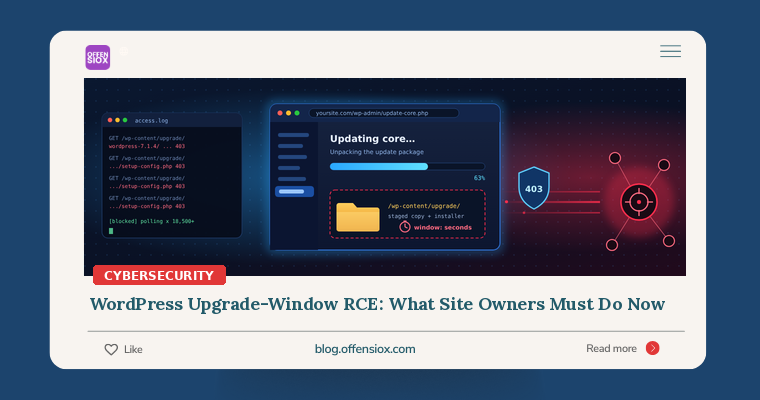
The most dangerous moment in a WordPress site’s life may be the moment it is being made safer. On 28 October 2026, WordPress shipped 7.1.4, a security release that fixes 22 vulnerabilities. One of them stands apart: an unauthenticated race condition in the core update process that can lead to remote code execution (RCE) while a site is in the middle of upgrading. Within a day, Wordfence was blocking attackers who were repeatedly polling sites to catch that window.
There is an awkward twist. The update to 7.1.4 is itself performed by the old, vulnerable upgrade code. So the order in which you do things matters. This post explains what happened, who is exposed, how the flaw works at a conceptual level, and the exact steps to close the gap safely.
TL;DR / Key takeaways
- What: A race condition in WordPress core updates (CVE-2026-119977, CVSS 8.1 per Wordfence; GHSA-4w3m-c66w-69mg) lets an unauthenticated attacker reach a staged copy of WordPress, including its installer, under
wp-content/upgrade/during a full-package update.- Who: WordPress 4.7 through 7.1.3 on servers where
wp-content/upgrade/is reachable over the web. Fixed in 7.1.4, 7.0.8, 6.9.11 and backports down to 4.7.39.- Activity: Wordfence recorded more than 18,500 requests to staged
setup-config.phppaths in the first 21 hours, and The Hacker News reported 62,969 blocked attacks in 24 hours. No confirmed site takeover has been reported so far.- Do first: Deny web access to
/wp-content/upgrade/at the web-server level before you run the update, then update to your branch’s fixed release.- Then check: Look for PHP files and
setup-config.phprequests underwp-content/upgrade/, unexpected admin users, plugins and PHP files.
Timeline
| When | What happened |
|---|---|
| 28 Oct 2026 | WordPress 7.1.4 released with 22 security fixes. Researcher Umut Bayram is credited with the upgrade-window RCE. Wordfence premium firewall rule deployed the same evening (per Rescana). |
| 29 Oct 2026 | WordPress publishes advisory GHSA-4w3m-c66w-69mg. Wordfence publishes its analysis and reports active probing. |
| 30 Oct 2026 | The Hacker News reports 62,969 attacks blocked by Wordfence in 24 hours. |
| 31 Oct 2026 | CVE-2026-119977 published by Wordfence as CNA (per Ostorlab and Rescana). |
| 27 Nov 2026 | Date Wordfence Free users receive the firewall rule, according to Rescana. |
Details are still emerging. Severity ratings differ: Wordfence scores it 8.1 (High) with the vector AV:N/AC:H/PR:N/UI:N/S:U/C:H/I:H/A:H, while WordPress’s own GitHub advisory labels it Low. Patchstack also notes the high attack complexity. That disagreement is about how hard exploitation is, not whether it is real. The upside for attackers is a full site takeover, and they are already trying.
How the flaw works
When WordPress applies a complete package core update, it downloads a ZIP of the new release and unpacks it into a working folder inside wp-content/upgrade/. Before 7.1.4, that folder’s name was derived directly from the package file name. Updating to 7.1.4, for example, produced something like wp-content/upgrade/wordpress-7.1.4. Anyone could guess the path.
That staged copy is a complete WordPress install, and it includes the installer (wp-admin/setup-config.php). The WordPress advisory sums it up:
“During a core update that uses a complete package, WordPress extracted the new files to a predictable directory inside the web-served upgrade folder. An unauthenticated attacker who wins a race against that extraction could reach remote code execution.”
Wordfence’s Alex Thomas explained the practical side to The Hacker News: because the staging folder is web-accessible on many servers, “an unauthenticated attacker who requests the installer at precisely the right moment can interact with the staged WordPress copy and progress to PHP code execution.”
In other words, for a few seconds there is a second, unconfigured WordPress sitting inside your site. Anyone who reaches its setup wizard first can point it wherever they like. From there, a path to PHP code execution follows.
The conditions Wordfence lists are:
- a full-package update that includes the installer files;
- public web and PHP access to the staging folder;
- a predictable or discovered staging path;
- enough time to finish before WordPress deletes the temporary files.
The window “has been observed to last only seconds in normal lab environments.” This is why the attacks look like polling rather than a single shot. Two of the largest sources Wordfence tracked “repeatedly polled small groups of sites for roughly 14.5 hours, behavior consistent with trying to catch the brief upgrade window.” Other sources tried many variations of staging folder and version names.
Here is the part that makes this week risky. Sites with automatic background updates are upgrading to 7.1.4 right now. Each of those upgrades opens the window, and attackers know exactly when sites are likely to update.
What 7.1.4 changed
According to Ostorlab’s review of the fix and Wordfence’s summary, 7.1.4 hardens the process in three ways:
- Random folder names. It appends 16 random characters to the staging folder name, so the path can no longer be guessed.
- An index guard. It keeps an
index.php(“Silence is golden”) in the upgrade folder so the folder cannot be listed. - Safer config handling. It adds
wp-config.phpto the files that are never copied from the staged package into the live site.
Ostorlab points out that the fix “does not remove web access to the upgrade folder itself.” Defence in depth still means blocking the folder at the web server.
Am I affected?
You are potentially exposed if all of these are true:
- Version: Your site runs WordPress 4.7.0 to 7.1.3, or any branch below its fixed release (table below).
- Update method: The site updates itself with WordPress’s built-in updater, either automatically or from Dashboard → Updates. Sites deployed through Composer or git, with
DISALLOW_FILE_MODSset totrue, never run the in-place upgrader. HOL notes that “the upgrade race does not apply” to them. They still need 7.1.4 for the other 21 fixes. - Exposure: Requests to
https://yoursite/wp-content/upgrade/...reach PHP. Many shared hosting setups allow this by default.
Fixed releases per branch (from the WordPress advisory):
| Branch | Fixed in | Branch | Fixed in |
|---|---|---|---|
| 7.1 | 7.1.4 | 6.2 | 6.2.15 |
| 7.0 | 7.0.8 | 6.1 | 6.1.16 |
| 6.9 | 6.9.11 | 6.0 | 6.0.18 |
| 6.8 | 6.8.12 | 5.9 | 5.9.20 |
| 6.7 | 6.7.11 | 5.8 → 5.0 | 5.8.19 … 5.0.31 |
| 6.6 | 6.6.11 | 4.9 | 4.9.35 |
| 6.5 | 6.5.14 | 4.8 | 4.8.34 |
| 6.4 / 6.3 | 6.4.14 / 6.3.14 | 4.7 | 4.7.39 |
WordPress.org said on release day that older-branch backports “are in progress and will ship as they become ready”. If you are on an old branch, confirm that your fixed build actually exists before you rely on it. Better still, plan to move to 7.1.
A quick exposure test: ask your web server for the folder. Do this only against sites you own.
~|#| Expect 403 (blocked) or 404. A 200, or a directory listing, means the folder is web~|-|reachable.
curl ~|-|s ~|-|o /dev/null ~|-|w "%{http_code}\n" https://example.com/wp~|-|content/upgrade/
What to do: a prioritised checklist
Immediately (today)
1. Block the upgrade folder at the web server before updating. Rescana notes that the update to 7.1.4 is performed by the old unpacking code, so close the window first. WordPress writes to this folder through the filesystem, not over HTTP, so blocking web access does not break updates.
Nginx (inside the site’s server block, then reload):
location ^~ /wp~|-|content/upgrade/ {
    return 403;
}
Apache (vhost config, or the .htaccess in the site root, not a file inside the upgrade folder):
RedirectMatch 403 ^/wp~|-|content/upgrade/
LiteSpeed and OpenLiteSpeed read the same .htaccess rule. If you use a CDN or edge WAF (Cloudflare, Sucuri and similar), add a rule that blocks the /wp-content/upgrade/ path there as well. Ostorlab and Rescana warn that a WordPress security plugin alone may not see these requests, because “the malicious request goes directly to a PHP file without loading WordPress first.”
2. Update. Update from Dashboard → Updates, or with WP-CLI:
wp core version          ~|#| what you run now
wp core update           ~|#| latest (7.1.4)
~|#| or stay on your branch, e.g.:
~|#| wp core update ~|-|~|-|version~|=|7.0.8
wp core verify~|-|checksums ~|#| confirm core files match the official release
3. Re-test the folder. Run the curl check again and confirm a 403 response.
This week
4. Hunt for attempts and compromise. Search your access logs for any PHP request under the upgrade folder, especially the installer:
~|#| Nginx
grep ~|-|iE "wp~|-|content/upgrade/[^ ]+\.php" /var/log/nginx/access.log*
~|#| Apache
grep ~|-|iE "wp~|-|content/upgrade/.*/setup~|-|config\.php" /var/log/apache2/access.log*
~|#| Leftover PHP in the staging area (after 7.1.4, only index.php should remain)
find wp~|-|content/upgrade ~|-|name "*.php" | sort
A request that returned 404 or 403 was a failed probe. Note the source IPs, but there is no reason to panic. A 200 response to setup-config.php, or any other PHP file under the upgrade folder, around the time of a core update is a lead to investigate. So is a stray wp-config.php in the staging area.
If you send web logs to a SIEM, the same logic works as a standing detection. Here is a Splunk example; adapt the field names to your own setup:
index~|=|web sourcetype IN ("nginx:access","access_combined")
  uri_path~|=|"/wp~|-|content/upgrade/*" uri_path~|=|"*.php"
| stats count min(_time) as first max(_time) as last values(status) as statuses by src_ip, uri_path
| sort ~|-| count
5. Check for footholds. Wordfence recommends looking for unfamiliar administrator accounts, plugins and PHP files:
wp user list ~|-|~|-|role~|=|administrator ~|-|~|-|fields~|=|ID,user_login,user_email,user_registered
wp plugin list ~|-|~|-|status~|=|active,inactive ~|-|~|-|fields~|=|name,status,version
~|#| PHP files changed in the last 7 days outside the uploads folder
find . ~|-|name "*.php" ~|-|mtime ~|-|7 ~|-|not ~|-|path "./wp~|-|content/uploads/*" | head ~|-|50
~|#| PHP files should never live in uploads
find wp~|-|content/uploads ~|-|name "*.php"
If you find anything unexplained, treat the site as compromised. Take a forensic copy, restore from a known-good backup taken before the update, rotate the database password, salts in wp-config.php and all admin passwords, and then investigate how far the attacker got.
6. Inventory every WordPress install you are responsible for. That includes old marketing microsites, staging copies, landing pages built by agencies and forgotten subdomains. Rescana calls the sites that sit outside normal patching “the long tail.” In our experience, that is where compromises are actually found.
Longer term
- Stop updating in place on production where you can. Build and deploy WordPress through Composer or git, and set
DISALLOW_FILE_MODSin production. The site can then never rewrite its own code, which removes this entire class of race. - Deny PHP execution in writable folders (
wp-content/uploads/andwp-content/upgrade/) by default in your server templates. - Do not rely on delayed WAF signatures alone. Free tiers of plugin firewalls often receive rules weeks later. According to Rescana, Wordfence Free users get this one on 27 November. Server-level rules and fast patching close that gap.
- Monitor file integrity. Run
wp core verify-checksumson a schedule, or use a file-integrity monitor, so unexpected PHP files raise an alert within hours.
OffensioX perspective
This bug is a good reminder that update mechanisms are attack surface. We have seen the same pattern in supply-chain incidents this year: the machinery that keeps software current has the most privilege and gets the least scrutiny. Here the flaw was not in a plugin, which is where most WordPress risk usually lives, but in core. It lasts only seconds. Yet attackers are willing to spend 14 hours polling a handful of sites to catch those seconds, because one success means a full server-side takeover. That says a lot about how cheap automated attacks have become.
For businesses in Pakistan and across South Asia, where WordPress and WooCommerce power a large share of company websites and online shops, often on shared hosting with permissive defaults, the lesson goes beyond “click update.” Know where every site lives. Know which server configuration it runs on. Make sure writable folders cannot execute code. If you would like an independent check of your WordPress estate, from hosting configuration to plugin exposure, OffensioX offers web application penetration testing and security assessments that cover exactly these gaps.
References
- WordPress.org: WordPress 7.1.4 Security Release
- WordPress GitHub advisory GHSA-4w3m-c66w-69mg: race condition during core updates
- The Hacker News: WordPress RCE Flaw Draws Nearly 63,000 Attacks
- Wordfence: WordPress 7.1.4 Security Release (upgrade-window RCE)
- Ostorlab: WordPress Core Upgrade-Window RCE, Fixed in 7.1.4 (CVE-2026-119977)
- Rescana: WordPress Core 7.1.4 Fixes an Unauthenticated Upgrade-Window Race RCE
- HOL Guard: WordPress 7.1.4 upgrade race campaign record
- SecurityOnline: WordPress Core Vulnerability Exploited in the Wild
- Cyber Security News: WordPress 7.1.4 Fixes 22 Security Flaws
- CVE record: CVE-2026-119977